Animation Sets Tab
Animation sets allow you to store a series of animation clips that are frequently used in combination. For example, you could animate a figure raising its arm above its head and save the limb’s movements to a named animation set.
Creating & Editing Animation Sets
To work with animation sets, open the Animation palette by selecting Window > Animation Palette. Click the Animation Sets tab to open the Animation Sets palette, as shown.
The Frame Rate, Time control, Frame Indicator, Play controls, and Skip Frames button all function as described in previous sections of this chapter.
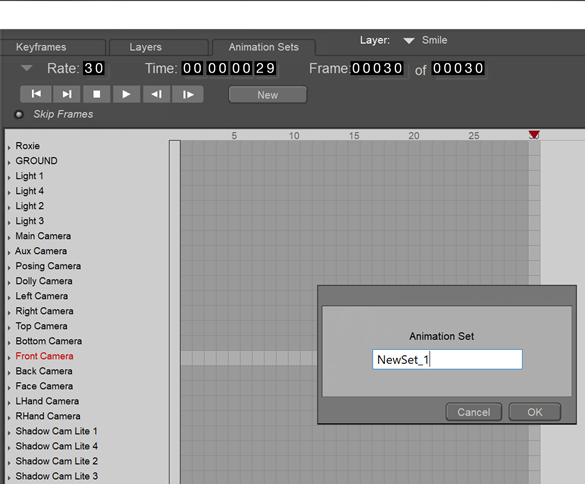
Creating an Animation Set.
- To create a new animation set, click the New button and name your new set. Doing so will populate the Animation Sets tab with additional editing controls.
- To delete an animation set, select the set from the pop-up menu to the right of the Attributes button, and click the Delete button.
- To add selected items and/or frames to your animation set, click and drag to make your selection and click the + button. You can select any combination of items/frames. The start and end frames will be made identical for all items in the animation set.
- To remove selected item(s) and/or frame(s), make your selection and click the – button.

Several buttons allow you to add, remove, and add items and frames to an animation set.
- To save an animation set, you will need to save the pose to the Library. To save an animation set pose, first open the Pose library. Click the Save to Library button at the bottom of the Library palette to display the New Set dialog. Next, click the Select Subset button at the bottom of the dialog to open the Select Objects dialog. Click the Select from Animation Set button to display a list of the available animation sets. Choose one of the sets, and click OK to save the animation set to the library. Repeat for additional sets you want to save.
Applying Animation Sets to Figures
You can also apply animation sets to figures. For example, if you create an animation set of an arm being raised, applying that set to your current figure will cause its arm to raise in the exact way specified by the animation set. This feature can help you save time by allowing you to reuse complex animations over and over.