Using the Current Actor Pull-down Menu
To select a body part Actor using the pull-down menus:
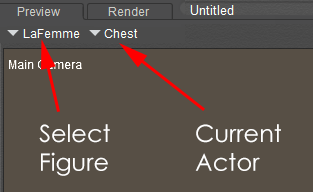
Select Figure and Current Actor menus.
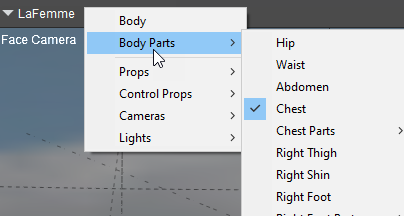
Drill through submenus to select your item.
- Select the desired figure using the Select Figure pull-down menu.
- Select your desired body part using the Current Actor Item pull-down menu.
This method can be preferable if your scene has several figures and/or detailed body parts (such as poseable fingers and toes).
If there are too many actors or scene elements displayed in the Current Actor pull-down menu, you can increase the Hierarchical Threshold value in the Interface tab of the Preferences dialog.