Creating a Simulation
The Physics Simulation palette allows you to create one or more physics simulations in your Poser project. Each simulation defines the following:
The objects that will be included in that physics simulation.
The frames in your animation project in which the physics calculations will be applied to the defined objects
Settings that will be applied to all of the objects included in that simulation.
To create a new simulation, follow these steps:
From the Physics Simulation palette, click the New button to create a new simulation.
The Simulation Name dialog will prompt you to enter a name for the simulation. After you enter the name, click OK to create the simulation.
To limit your simulation to certain frames in your project, enter the starting and ending frames of the desired frame range in the Start Frame and End Frame fields.
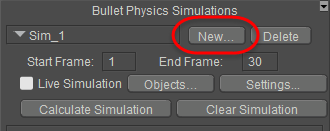
Setting up a new simulation.