.png)
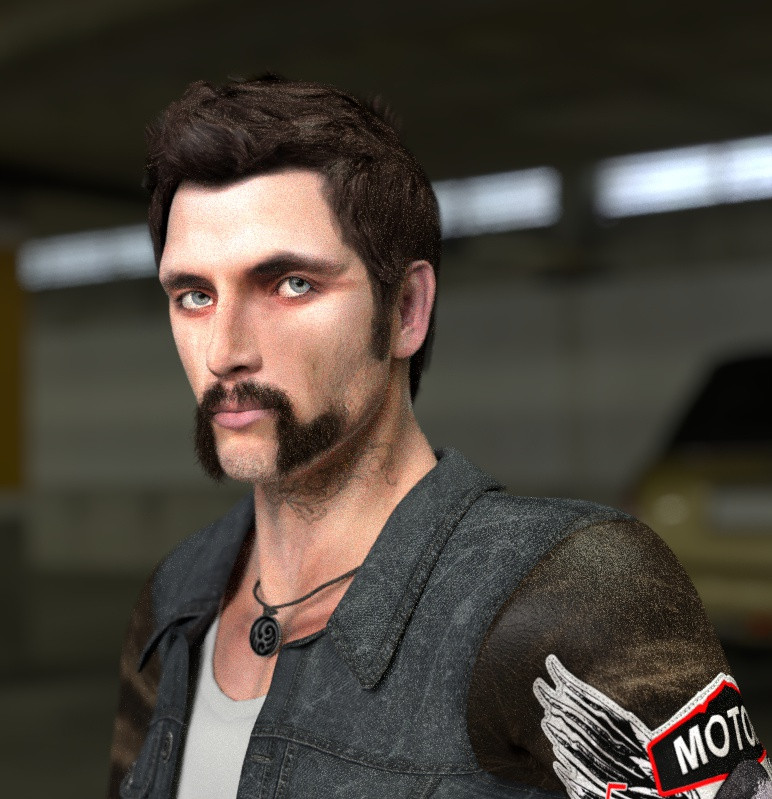
Poser has long been celebrated as a powerful storytelling tool and an artist’s stage where characters, moods, and entire worlds come to life. But beyond narrative scenes and dynamic renders, Poser is also an exceptional portrait studio. It gives every user the chance to step into the role of photographer, directing a limitless cast of characters with complete creative freedom. Whether you’re crafting a dramatic close‑up, a soft and intimate study, or a bold stylized portrait, Poser offers all the tools you need to shape expressive, memorable images.
Many artists are still chasing that “perfect portrait,” and this week we’d love to share some friendly, practical tips to help you get closer to it.
Many artists are still chasing that “perfect portrait,” and this week we’d love to share some friendly, practical tips to help you get closer to it.
Focus on the Face
Most portraits revolve around the face and shoulders, which means the smallest details matter. Eyes, lips, brows, subtle asymmetry are all features that carry emotion and personality.
Direct eye contact is almost always the strongest choice. Your character can look up, down, or off to the side, but when they meet the camera head‑on, the viewer feels instantly connected.
Direct eye contact is almost always the strongest choice. Your character can look up, down, or off to the side, but when they meet the camera head‑on, the viewer feels instantly connected.
Use the Right Camera
Poser’s Face Camera is your best friend for portrait work. Even without customization, it’s designed to frame the face naturally and reduce distortion. You can tweak it to suit your style, but starting with the Face Camera will usually give you cleaner, more flattering results than the Main Camera as the focal length in the Face Camera is by default at 95 mm making it a more flattering option for portraits.
For more on Focal Length and why it matters in portraiture please see our previous article HERE.
Highlight Distinctive Features
Portraits shine when they celebrate individuality. A beauty mark, a bold lip color, a unique brow shape, freckles, or a hint of jewelry can add charm and character. Even something as simple as bangs falling across the forehead can create a more striking composition.
Think of these elements as visual anchors that are small details drawing the viewer in.
Think of these elements as visual anchors that are small details drawing the viewer in.
Let Lighting Shape the Mood
Lighting is one of the most powerful tools in portrait creation. Soft lighting can create warmth and intimacy; sharper lighting can add drama and sculpt the face. Don’t hesitate to experiment with different setups such as rim lights, softboxes, colored gels (GOBOs), or even a single directional light with volume can completely transform the atmosphere.
A portrait isn’t just about the character but more about how the light tells their story.
Keep Backgrounds Minimal
A clean, simple background helps your character stand out. Busy environments can distract from the face, pulling attention away from the emotion you’re trying to capture. A subtle gradient, a muted color, or a softly blurred environment often works best.
Your character should be the star of the frame.
Add Depth for Realism
Depth of Field is a wonderful finishing touch. By keeping the focal point on the face and especially the eyes, you create a natural sense of realism and photographic authenticity. The slight blur in the background helps guide the viewer’s attention exactly where you want it.
A touch of uniform noise can also enhance realism, particularly in black‑and‑white portraits. It adds texture and a hint of photographic grit, though this is entirely a matter of personal taste.
Play, Experiment, Break Rules
Portraits thrive on creativity. Some of the most memorable images come from bending or breaking traditional rules so unexpected angles, unconventional lighting, unusual crops, or bold color choices can make a standout portrait.
Poser gives you the freedom to explore without limits. So try things, push boundaries, and enjoy the process. Every experiment teaches you something new about your characters and about your own artistic voice.
The Poser 14 software can be downloaded at: https://www.posersoftware.com/downloads. A 21-day free trial is available.
Owners of a Poser 11, 12 or 13 licenses can purchase an upgrade to Poser 14 here: https://www.posersoftware.com/store/products/974.
First time buyers can purchase a full Poser 14 license here: https://www.posersoftware.com/store/products/973.
The Poser 13 software can be downloaded at: https://www.posersoftware.com/downloads.
Owners of a Poser 11 or 12 licenses can purchase an upgrade to Poser 13 here: https://www.posersoftware.com/store/products/293.
First time buyers can purchase a full Poser 14 license here: https://www.posersoftware.com/store/products/292.